Contents of this article
You manage your web hosting in DirectAdmin, the web server's hosting panel. That's where you put files on your website, create databases and see how much space you use. You open DirectAdmin from the Hostage control panel; you don't need a separate password for it, only your control panel login.
The screenshots show a demo domain; in the text we use voorbeeld.nl. The control panel is in Dutch, so its labels are given in Dutch where needed. The DirectAdmin screenshots show the English interface; you can change the language with the globe icon marked EN in the narrow bar on the left.
Opening DirectAdmin
-
Go to the web hosting page of your domain
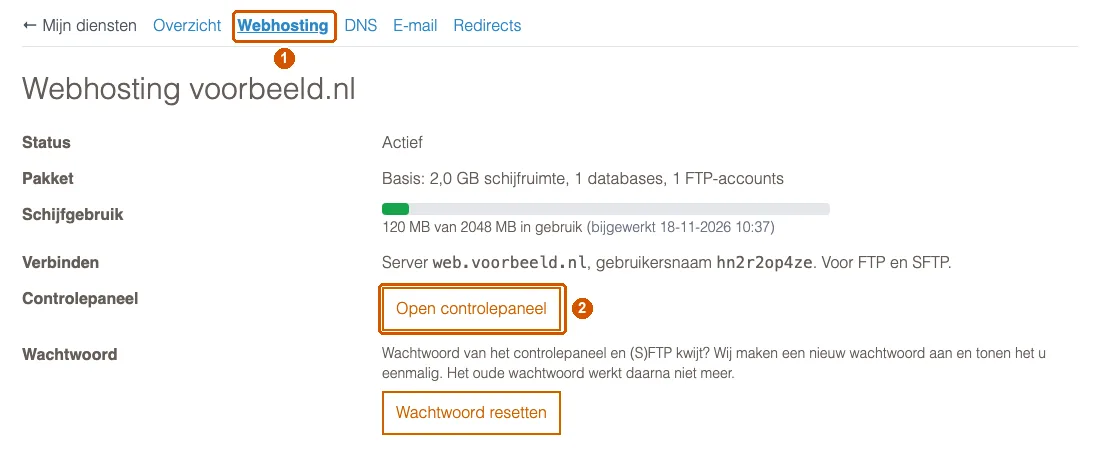
Log in to the control panel and go to Mijn diensten (My services). In your domain's row, click the globe icon in the web hosting column. This takes you to the Webhosting voorbeeld.nl page, which you can also reach through the Webhosting tab (1) on your domain's pages.
-
Click Open controlepaneel
Next to Controlepaneel (hosting panel), click Open controlepaneel (2). DirectAdmin opens in a new tab and you're logged in straight away.
If you don't see the button but the text "Toegang tot het controlepaneel nodig?" (Need access to the hosting panel?), or the page says your website is on one of our older servers, you can't open DirectAdmin from the control panel yet. Please contact us.
The dashboard
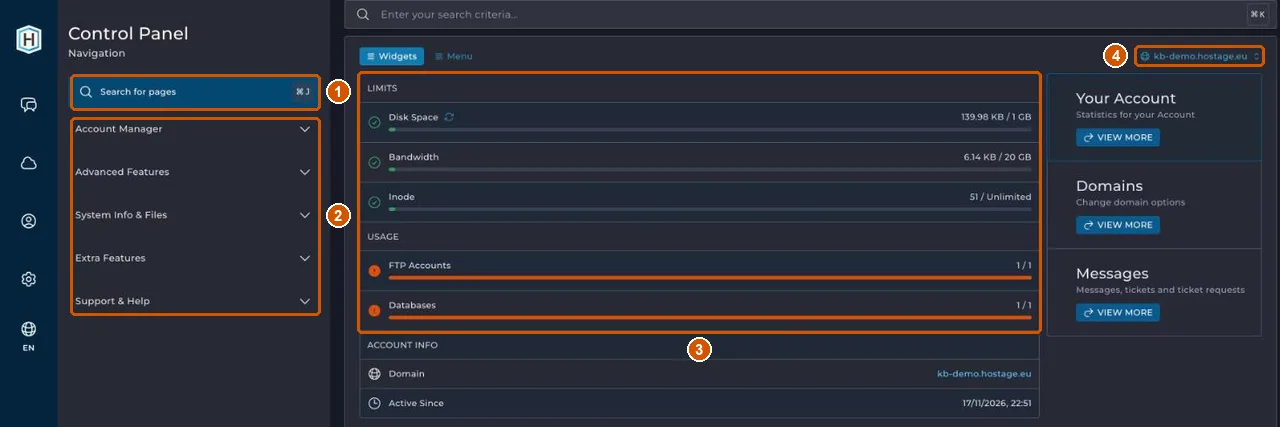
- Search for pages (1): type what you're looking for, such as
Databases, and open the page directly. - The menu (2): items are grouped. Account Manager holds databases, SSL certificates and PHP settings among others; Advanced Features holds backups among others.
- Limits and Usage (3): how much disk space (Disk Space) and traffic (Bandwidth) you use, and how many FTP accounts and databases your plan allows. A full bar means you've reached your plan's limit.
- The domain selector (4): if this account has more than one domain, choose here which domain the pages apply to.
Email isn't in DirectAdmin
Your mailboxes aren't in DirectAdmin but on our mail platform. You manage them in the control panel; see Create a mailbox in the control panel.
Password for FTP
If you want to use an FTP program, you do need a password. The Webhosting page lists the server and username under Verbinden (Connect). If you've lost the password, click Wachtwoord resetten (reset password): the control panel shows a new password for the hosting panel and (S)FTP once. The old one stops working.
Further reading
- Upload files with File Manager
- Create a database in DirectAdmin
- Log in and set up two-step verification
If it doesn't work
If DirectAdmin doesn't open, or the control panel shows an error, email support@hostage.nl with your domain name and the exact error message.
Was this article helpful?
Thank you for your feedback.
Thank you. What were you missing? Let us know at support@hostage.nl and we will add it to the article.
Related articles
- Check the SSL certificate for your website The SSL certificate is requested and renewed automatically; here's how to check it's in order.
- Change PHP settings in DirectAdmin Change a PHP setting for your website with an override in DirectAdmin.
- Upload files with File Manager in DirectAdmin Put your website files in your domain's public_html folder, with File Manager or FTP.
- Create a database in DirectAdmin Create a database for your website and safely store the login details you only see once.
Still stuck?
Send us a message. We will help you, usually within one working day.