
Contents of this article
If your website runs on PHP, like WordPress, you may need to change a PHP setting. A common example: you get a blank page and want to see the error message for a moment. In DirectAdmin you do this with an override: you pick a setting and the value you want. The screenshots show a demo domain.
Adding an override
-
Open PHP Settings
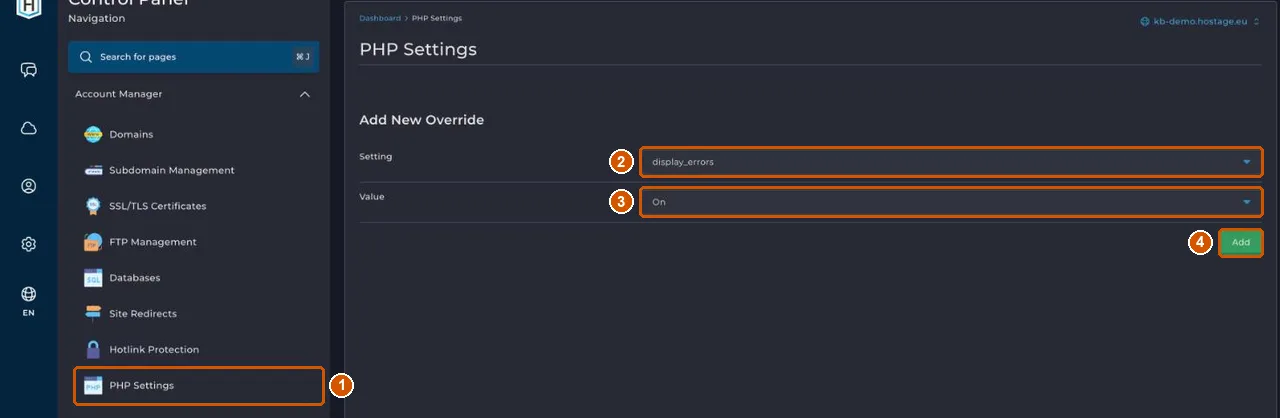
Open DirectAdmin from the control panel (see Log in to DirectAdmin) and choose Account Manager > PHP Settings (1).
-
Choose the setting
Under Add New Override, choose the setting you want to change in Setting (2), for example
display_errors. -
Choose the value
Choose the new value in Value (3), for example On.
-
Add the override
Click Add (4). Then reload your website to see the effect.
This page only offers the settings in the list. Contact support if you need a different PHP version.
Know what you're changing
Only change a setting if you know what it's for, for example because the documentation of your CMS or plugin asks for it. Write down what you change so you can undo it later. If your website stops working properly after a change, set the value back.
If it doesn't work
If the setting you need isn't in the list, or nothing changes after adding it, email support@hostage.nl with your domain, the setting and value you need, and any error message exactly as shown. See also Upload files with File Manager and Make and restore a backup.
Was this article helpful?
Thank you for your feedback.
Thank you. What were you missing? Let us know at support@hostage.nl and we will add it to the article.
Related articles
- Check the SSL certificate for your website The SSL certificate is requested and renewed automatically; here's how to check it's in order.
- Log in to DirectAdmin from the control panel Open DirectAdmin with one click from the control panel, and what you see on its dashboard.
- Upload files with File Manager in DirectAdmin Put your website files in your domain's public_html folder, with File Manager or FTP.
- Create a database in DirectAdmin Create a database for your website and safely store the login details you only see once.
Still stuck?
Send us a message. We will help you, usually within one working day.