
Contents of this article
If webmail is in a language you don't want, or the times on your messages are off, you can change that in the preferences. The setting applies to your own mailbox; colleagues with another mailbox set their own language. You need access to webmail; see Using webmail.
Changing the language and time zone
-
Open the preferences
In webmail, click the gear next to your name, top left. You land on the general preferences (General).
-
Choose the language
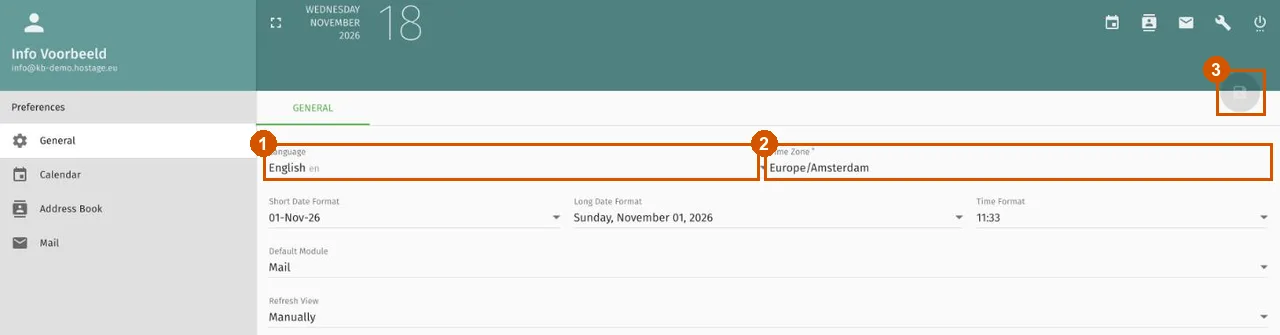
Click the Language field (1) and choose the language you want to use. If webmail is currently in Dutch, this field is called Taal.
-
Check the time zone
Time Zone (2) is the time zone webmail uses to show times. If you live in the Netherlands, it should say
Europe/Amsterdam. -
Save
Click the floppy-disk button top right (3); it turns green as soon as you've changed something. If you don't see the new language straight away, reload the page.
Other settings on the same page
The same page also lets you choose how dates and times are shown (Short Date Format, Long Date Format and Time Format) and which part of webmail opens after you log in (Default Module). Save those changes with the same button.
Further reading
If it doesn't work
If webmail stays in the old language, log out, log back in and check whether the setting was saved. If it still doesn't work, email support@hostage.nl with the email address and the exact error message.
Was this article helpful?
Thank you for your feedback.
Thank you. What were you missing? Let us know at support@hostage.nl and we will add it to the article.
Related articles
- Set up an out-of-office reply in webmail Set up an automatic reply that starts and stops on the days you choose.
- Using webmail: logging in and finding your way Logging in to webmail and finding your way around folders, messages and settings.
- Forward email automatically from webmail Forward mail from a mailbox to another address automatically using webmail.
- Create mail filters in webmail Sort incoming email automatically with rules in webmail.
Still stuck?
Send us a message. We will help you, usually within one working day.