
Contents of this article
Want to read a mailbox in your browser, for example on a computer without a mail program? The control panel links to webmail right next to the mailbox. You need the mailbox's email address and password to log in. The control panel is in Dutch, so labels are given in Dutch where needed.
Opening webmail
-
Go to E-mail for your domain
Click Mijn diensten (My services) in the menu and click the envelope icon in the E-mail column of your domain's row.
-
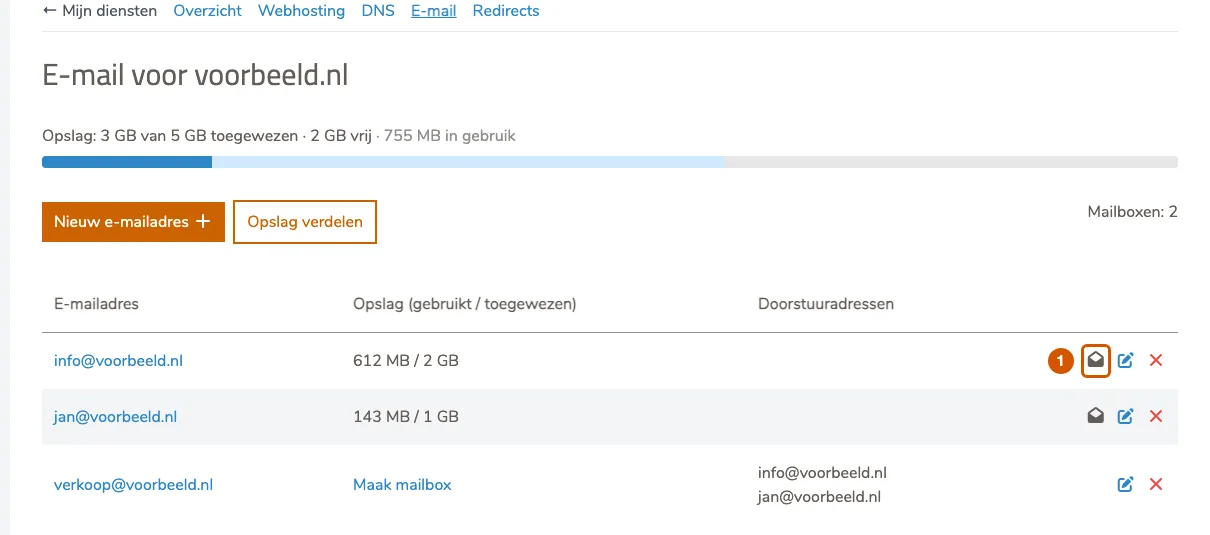
Click the webmail icon
On the right of the mailbox's row is an open envelope (1); hovering over it shows Webmail openen (open webmail). Click it.
-
Log in with the mailbox details
Webmail opens in a new tab. Log in there with the full email address, for example
info@voorbeeld.nl, and the mailbox password, then click Webmail. What the login looks like depends on the mail server your domain is on; with some mail servers you're logged in straight away. What you see next is explained in Using webmail.
Prefer a mail program?
For everyday use a mail program or your phone's mail app is more convenient. How to set one up is explained in Set up email in Outlook, on iPhone and Android.
If it doesn't work
If you get a message that webmail can't be opened right now, try again in a few minutes. If it still fails, email support@hostage.nl with the mailbox name and the exact message.
Was this article helpful?
Thank you for your feedback.
Thank you. What were you missing? Let us know at support@hostage.nl and we will add it to the article.
Related articles
- Set up a catch-all (and why you probably shouldn't) Have mail for non-existent addresses on your domain arrive in one mailbox, or turn that off again.
- Create a mailbox in the control panel Create a new email address with its own mailbox, storage and password.
- Change a mailbox password Set a new password for a mailbox in the control panel.
- Create a forwarder in the control panel Have mail for an address forwarded automatically to one or more other addresses.
Still stuck?
Send us a message. We will help you, usually within one working day.