Contents of this article
If you've lost a mailbox's password, an employee leaves or you no longer trust the password, you can set a new one yourself in the control panel. You don't need to know the old password. This is about a mailbox's password, not the password you use to log in to the control panel; you change that under Account > Beveiliging (security). The control panel is in Dutch, so labels are given in Dutch with a translation where needed.
Setting a new password
-
Click Wachtwoord (Password) next to the mailbox
Go to E-mail for your domain via Mijn diensten (My services). Click Wachtwoord (1) in the mailbox's row. You go straight to the Wachtwoord block on that mailbox's page.

-
Enter the new password
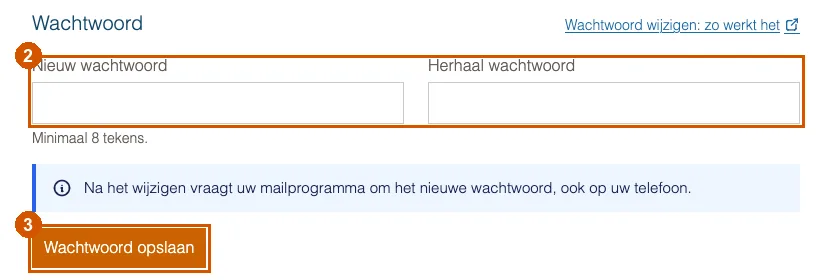
Enter the same new password twice under Nieuw wachtwoord and Herhaal wachtwoord (new password, repeat password) (2). It must be at least 8 characters long.
-
Click Wachtwoord opslaan (Save password)
Click Wachtwoord opslaan (3). You see a message that the password was changed.
A strong password
Choose a password you don't use anywhere else. A phrase of a few unrelated words is easier to remember and harder to guess than a short password full of special characters. If you use a password manager, let it create and store the password.
Afterwards: update your devices
Apps and phones that use the mailbox keep trying the old password and show a login error. Enter the new password on each device; where to do that is explained in Setting up email in Outlook, on iPhone and on Android.
If it doesn't work
If the control panel says the passwords don't match, type both again. If the new password still doesn't work in your mail program after a few minutes, email support@hostage.nl and include the exact error message.
Was this article helpful?
Thank you for your feedback.
Thank you. What were you missing? Let us know at support@hostage.nl and we will add it to the article.
Related articles
- Set up a catch-all (and why you probably shouldn't) Have mail for non-existent addresses on your domain arrive in one mailbox, or turn that off again.
- Create a mailbox in the control panel Create a new email address with its own mailbox, storage and password.
- Create a forwarder in the control panel Have mail for an address forwarded automatically to one or more other addresses.
- Add an alias to a mailbox Have an extra address, such as verkoop@, arrive in a mailbox you already have.
Still stuck?
Send us a message. We will help you, usually within one working day.