
Contents of this article
Your email package has a fixed amount of storage that your mailboxes share. If one mailbox fills up while another barely uses anything, you can move the space yourself. This article shows how, using Opslag verdelen (divide storage) in the control panel. The control panel is in Dutch, so labels are given in Dutch with a translation.
Dividing storage
-
Check your domain's storage
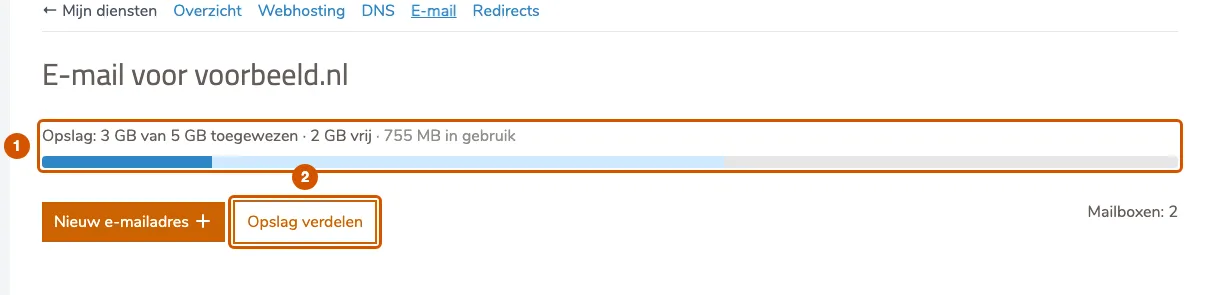
Go to E-mail for your domain via Mijn diensten (My services). At the top you see how much storage is assigned, how much is still free and how much is actually in use (1). Click Opslag verdelen (2).
-
Enter the new size per mailbox
For each mailbox you see how much it uses and how much it has now. Enter the new size in the Nieuw (new) column (3), in the unit shown above it (GB, or MB for a small package). Decimals are fine, for example
2,5. Changing one mailbox doesn't change the others; Nog vrij (still free) below the table shows how much space is left.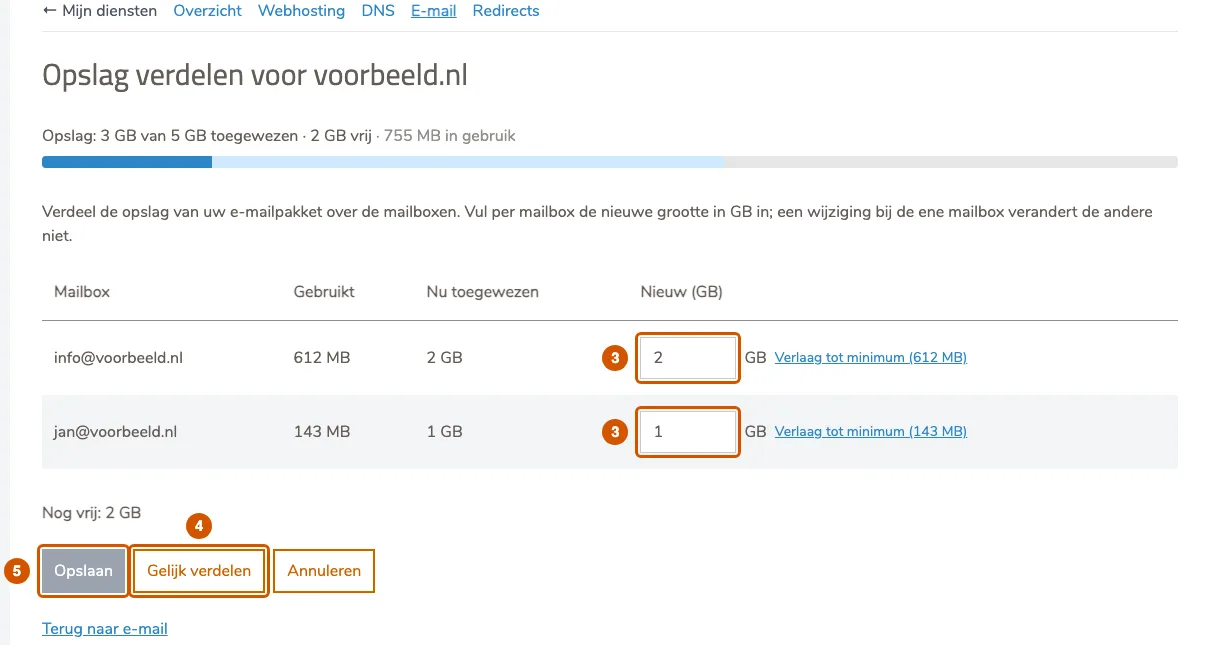
-
Or split evenly
Gelijk verdelen (split evenly, 4) divides your package's storage evenly between the mailboxes. A mailbox that already uses more than its equal share keeps at least what it uses.
-
Save
Click Opslaan (Save, 5). The button only works once you've changed something and the total fits within your package. The new split is active within a few minutes. Annuleren (Cancel) puts the fields back as they were.
Things to keep in mind
- A mailbox can't be made smaller than what it already uses, and always has at least 100 MB. Verlaag tot minimum (lower to minimum) next to a field sets a mailbox to that floor in one click.
- The total can't exceed your package. Need more? Contact us about a larger package.
- A mailbox with its own package is greyed out in the list and doesn't count.
If it doesn't work
If you see a message that the mailboxes have changed in the meantime, reload the page. For any other error, email support@hostage.nl and include the exact message. Creating a new mailbox is covered in Create a mailbox.
Was this article helpful?
Thank you for your feedback.
Thank you. What were you missing? Let us know at support@hostage.nl and we will add it to the article.
Related articles
- Set up a catch-all (and why you probably shouldn't) Have mail for non-existent addresses on your domain arrive in one mailbox, or turn that off again.
- Create a mailbox in the control panel Create a new email address with its own mailbox, storage and password.
- Change a mailbox password Set a new password for a mailbox in the control panel.
- Create a forwarder in the control panel Have mail for an address forwarded automatically to one or more other addresses.
Still stuck?
Send us a message. We will help you, usually within one working day.