
Contents of this article
If your domain uses our nameservers, you manage its DNS records yourself in the control panel. This article shows how to add a record, using an A record that points shop.voorbeeld.nl at a server as the example. What the record types do is explained in DNS records explained. The control panel is in Dutch, so labels are given in Dutch with a translation.
Adding a record
-
Open DNS for your domain
Click Mijn diensten (My services) in the menu and click the icon in the DNS column of your domain's row (1).

-
Click Nieuw record (New record)
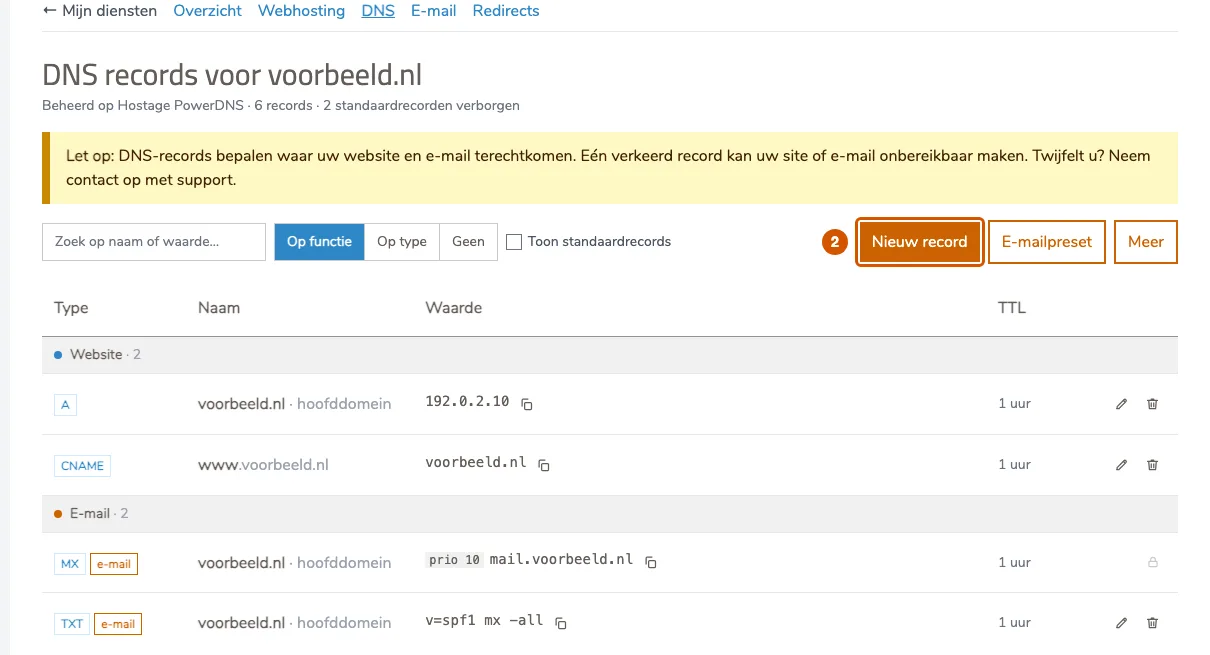
You see the records currently in your zone, grouped by purpose. Click Nieuw record (2).
-
Choose what to set up
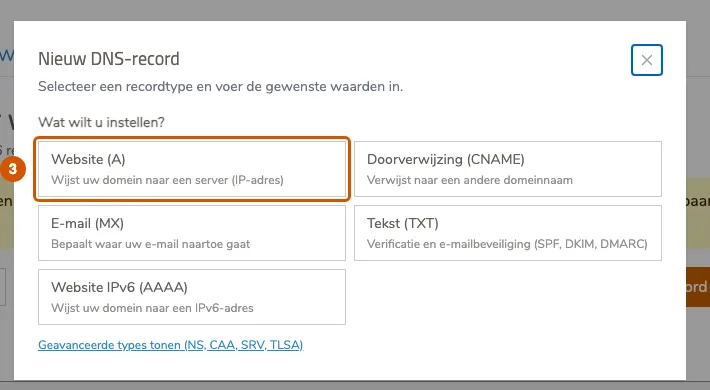
Choose the record type. For a website on its own server that's Website (A) (3). The NS, CAA, SRV and TLSA types are under Geavanceerde types tonen (show advanced types).
-
Fill in the record
- Under Naam (name, 4), enter the part before your domain name, for example
shop. Below the field you see which address the record applies to. Leave it empty and the record applies to the domain itself. - Under IPv4-adres (5), enter the server's address, which you get from your web developer or hosting provider.
- Under Hoe lang mag dit onthouden worden? (TTL) (6), keep 1 uur (aanbevolen) (1 hour, recommended) unless you're about to move your website or mail to another server.
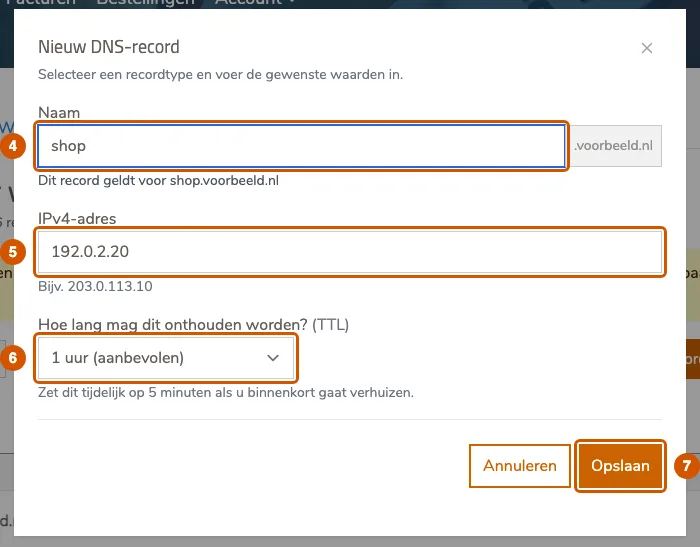
- Under Naam (name, 4), enter the part before your domain name, for example
-
Save
Click Opslaan (Save, 7). The record appears in the list. How quickly the rest of the internet sees the change depends on the TTL of earlier answers.
Domain not on our nameservers?
Then you see a red notice at the top listing the nameservers to set for your domain, and the Nieuw record button is missing. Changes only take effect once your domain points to our nameservers. If your domain is registered with us, contact us and we'll switch it for you.
If it doesn't work
If the window shows an error when saving, read it carefully: it usually says exactly which field is wrong. If you're stuck, email support@hostage.nl with the record you wanted to add and the exact error message.
Was this article helpful?
Thank you for your feedback.
Thank you. What were you missing? Let us know at support@hostage.nl and we will add it to the article.
Related articles
- Set up a catch-all (and why you probably shouldn't) Have mail for non-existent addresses on your domain arrive in one mailbox, or turn that off again.
- Create a mailbox in the control panel Create a new email address with its own mailbox, storage and password.
- Change a mailbox password Set a new password for a mailbox in the control panel.
- Create a forwarder in the control panel Have mail for an address forwarded automatically to one or more other addresses.
Still stuck?
Send us a message. We will help you, usually within one working day.